

AI classification
Classification explains the evidence behind each category and the configured heal, warn, or fail action. Review the reasoning in the run viewer and override the category when the evidence supports a different diagnosis.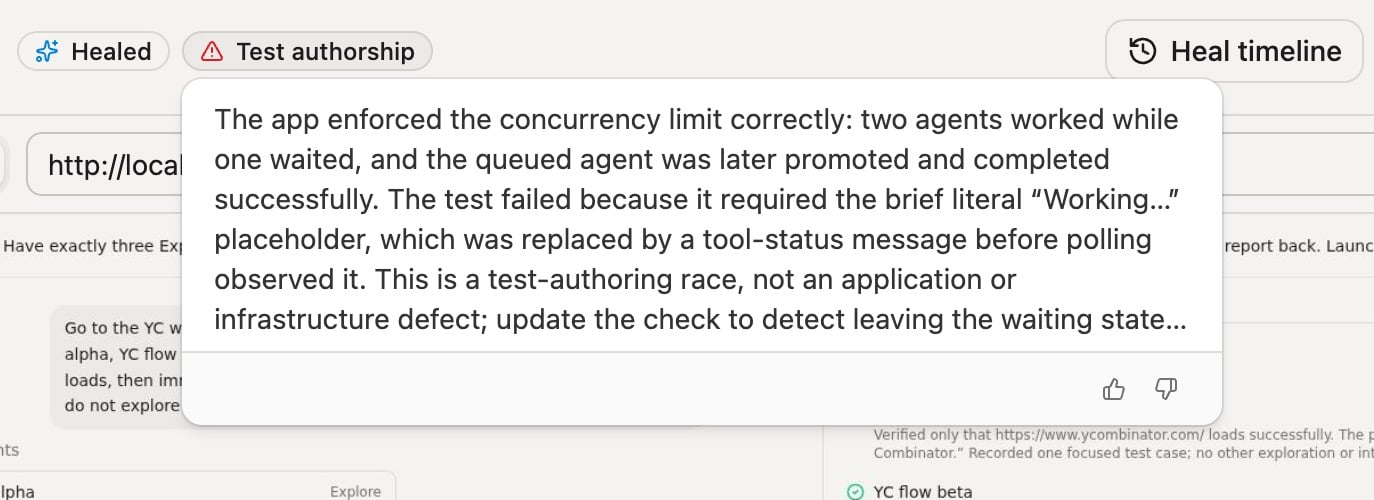
Classification identifies a test-authorship race and routes it to healing
ai.classification. Category actions and
project-specific guidance live in
Classification settings.
When classification puts a failure in an application bug category and your
workspace has Linear connected, the
run viewer’s Create Linear issue opens an issue draft whose description is a
prompt for your coding agent, with the run link, the classification reasoning,
and the error. It also includes the test link, branch, commit, root cause, and
steps before the failure when they’re available.
AI triage
Themomentic-mobile CLI has no ai classify or ai triage commands. For
mobile failures, use the
momentic-maintain skill with the
hosted Momentic MCP server for run history and
quarantines and the
mobile MCP server for run
artifacts.
Run tests into a results directory, then triage failures from that directory:
--no-save. Triage never overwrites a
category you set by hand in the run viewer.
A failure that was transient or came from outside your test can end with No
test change: a successful outcome that keeps the test as it is. Triage
delivers a repair only when it changes the test or a module, so it does not open
a pull request when those files are unchanged.
A failing run identifies the failed step and suggests the triage command:
slow-nav repair was written to disk as:
slow-nav.test.yaml
momentic-maintain with
the run ID.
To keep CI passing while a heal is pending, see
Let the verdict gate CI.
For CI, make sure triage runs even when the test step fails. Each repair attempt
starts a browser, so if browsers run locally, size the runner for up to one
browser per --parallel worker (one by default):
.github/workflows/momentic.yml
momentic ai reference covers
alternative run selectors, queue filters, parallelism, delivery overrides, and
exit codes.
Classify during the run
In-flow classification runs the classification agent insidemomentic run, when
a run exhausts its retries. The CLI includes a category, reasoning, and triage
action when the run exits, so CI does not need a separate classification step.
Prefer this over invoking
momentic ai classify
afterwards.
Enable it
Turn it on inmomentic.config.yaml:
momentic.config.yaml
What happens on a failure
When a run fails after all retries, the CLI shows aClassifying failure step
and the agent inspects the failed step, screenshots, error details, evidence
from past runs, and git context when available. The CLI writes the verdict into
the run’s results:
- The category, reasoning, confidence, and recoverability appear in the CLI output and in the run viewer’s failure details.
- The category’s configured action (
heal,warn, orfail) is attached to the run, so downstream steps such asmomentic ai triageandmomentic results checkcan act on it without re-classifying. - With transient failure recovery enabled, a failure the classifier judges one-time recoverable triggers an in-run recovery attempt guided by its reasoning.
Let the verdict gate CI
By default the classifier only records a category. Every failed test still fails CI. SetoverrideExitCode: true so failures routed to heal or warn exit
0. The job passes while the failure is repaired or reported. Failures routed
to fail (for example BUG) still exit 1.
momentic.config.yaml
--classify-override-exit-code to
momentic run. To skip classification for one invocation, pass --no-classify.
In-flow vs momentic ai classify
momentic ai classify runs the same agent as a separate command against
already-finished runs. Prefer the config-driven in-flow setup for CI:
- The in-flow setup needs no separate CI command or run selector. The verdict is
part of the run result when
momentic runexits. - The exit-code override can only be applied while the run is still deciding its
exit code, so
overrideExitCodeworks only in-flow. - The CLI saves the verdict automatically;
ai classifypersists only with--save.
ai classify when you want to re-classify a past run, classify runs
from an older CLI version, batch-classify a run group or commit, or ask
follow-up questions with --interactive.