> ## Documentation Index
> Fetch the complete documentation index at: https://momentic.ai/docs/llms.txt
> Use this file to discover all available pages before exploring further.
# Failure recovery
> Auto-recovers from transient test failures like slow loads, cookie banners, and race conditions.
Failure recovery is in beta and may change.
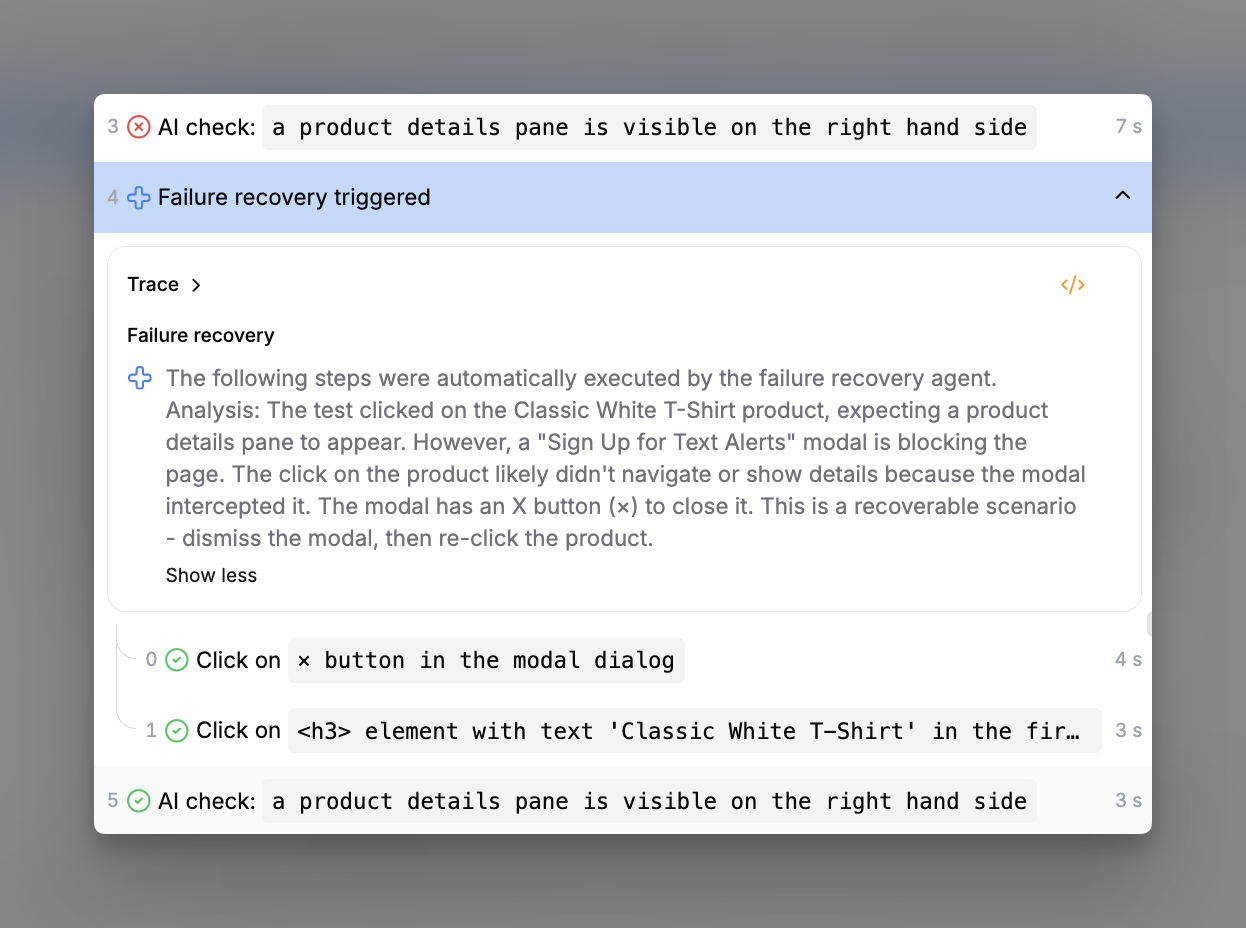
On a failure, Momentic classifies the cause as recoverable or not. For
recoverable failures, it generates and executes recovery steps and retries the
failed step.
| Classification | Example |
| --------------- | -------------------------------------------------------------------- |
| Recoverable | Cookie modal blocks the target, transition mid-flight, stale locator |
| Not recoverable | Real regression, 500 error, network outage, CAPTCHA, browser crash |
Recovery adds latency: 5-20s for diagnosis, up to 10s per generated step.
Recovery activity appears in the run viewer and CLI output. You can filter runs
by recovery status.
 ## Eligibility
* Only runs with `CI=true` are eligible (editor sessions never trigger recovery)
* A single run can recover at most 3 times
* Only primitive steps, not modules or **AI action**
* Infrastructure failures (timeouts, 5xx, crashes) are never recovered
* Configuration errors (invalid options, nonsensical sequences) are never
recovered
## Configuration
Enable per test in test options, or set the default via
[`ai.failureRecovery`](/configuration/ai#ai-failurerecovery) in
`momentic.config.yaml`:
```yaml momentic.config.yaml theme={null}
ai:
failureRecovery: true
```
Test description guides recovery intent, use it to describe scenarios that
should or should not be treated as recoverable.
## Usage guidance
Treat frequent recovery as a flakiness signal, not a success.
* Don't rely on recovery as the only reason a test passes
* Fix the underlying app or test behavior
* [Quarantine](/reliability/quarantine) persistently flaky tests
* Use recovery-status filters in the run viewer to spot trends
## Eligibility
* Only runs with `CI=true` are eligible (editor sessions never trigger recovery)
* A single run can recover at most 3 times
* Only primitive steps, not modules or **AI action**
* Infrastructure failures (timeouts, 5xx, crashes) are never recovered
* Configuration errors (invalid options, nonsensical sequences) are never
recovered
## Configuration
Enable per test in test options, or set the default via
[`ai.failureRecovery`](/configuration/ai#ai-failurerecovery) in
`momentic.config.yaml`:
```yaml momentic.config.yaml theme={null}
ai:
failureRecovery: true
```
Test description guides recovery intent, use it to describe scenarios that
should or should not be treated as recoverable.
## Usage guidance
Treat frequent recovery as a flakiness signal, not a success.
* Don't rely on recovery as the only reason a test passes
* Fix the underlying app or test behavior
* [Quarantine](/reliability/quarantine) persistently flaky tests
* Use recovery-status filters in the run viewer to spot trends